Blog · Rough cut and paper edit
How to speed up A-roll editing for long-form talking-head videos
By Eran Strassburg · Updated 2026-10-10
The short answer
A-roll editing is slow for three reasons: finding the good takes, removing restarts and pauses, and deciding the order. All three can be settled from the transcript before you open your editor. In FirstCut you get a structured first cut, remove repeated takes in one action, tighten pauses with a dial, and export a timeline with the A-roll already in order.
The three time sinks
- Finding takes. You said the same thing three times and have to listen to all three.
- Cleaning. Every restart, every "um", every dead second is a separate cut.
- Ordering. The recording followed your notes, and the video needs a better order than your notes had.
Fix order first, tightness second
Tightening a section you later delete is wasted work. Decide what is in the video and in what order, and only then remove pauses and fillers from what is left. This is the same rule as rough cut before fine cut.
Repeated takes and restarts
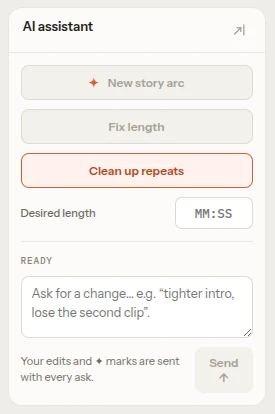
In a transcript a restart is easy to see: the same opening words twice in a row. FirstCut's assistant has a clean-repeats action that looks for repeated phrases in the cut and removes the extra ones. If it finds nothing to remove, it says so and uses no AI cut.
Pauses and filler words
FirstCut catalogues filler words and quiet gaps inside each clip and applies them through a Pace dial with four levels: natural, fast, faster and fastest. Nothing is deleted, so you can turn it back. How it works is in removing filler words and silences.
What is left for the NLE
- B-roll, screen recordings and cutaways.
- Captions, titles and graphics.
- Music, sound and color.
- Camera switching, if you shot more than one angle.
FirstCut does none of these. It delivers the spoken track in order, as a timeline that points at your original file.
A sample session
- Link the recording. Only the audio uploads.
- Pick a length, or leave it on Auto, which aims at about a third of the talking.
- Generate, and watch the cut once through.
- Delete or reorder clips, and run clean-repeats.
- Set the Pace dial and listen to a minute of it.
- Export for your editor and add everything visual there.
Questions
Does it add B-roll or captions?
No. It works on the spoken track and hands the rest to your editor.
Does it work on a single-camera vlog?
Yes, if the video is led by speech.
How long can the recording be?
Each file can be up to 2 hours. A sequence takes up to 1 hour of footage on the Free plan and up to 10 hours on a paid plan.
Related guides
- Removing filler words and silences without making the cut choppy
- How to make a rough cut from interview footage, by hand and with AI
- AI tools for video editors, sorted by the job they do
- Make a podcast rough cut with FirstCut
Try it on your own footage
FirstCut is free to try with no install and no credit card. Start a rough cut → · Or open the live demo, which needs no account.