NARRATIVE EDITOR

Edit the story before you edit the video.

Explore your story, beat by beat.

FirstCut finds the stories inside your footage and turns them into editable narratives. Explore different story arcs, reshape beats, refine clips down to individual words, and play the result in your browser.

Try the demo
From narrative arc to individual words.

Your entire narrative, connected from beats to clips to words.

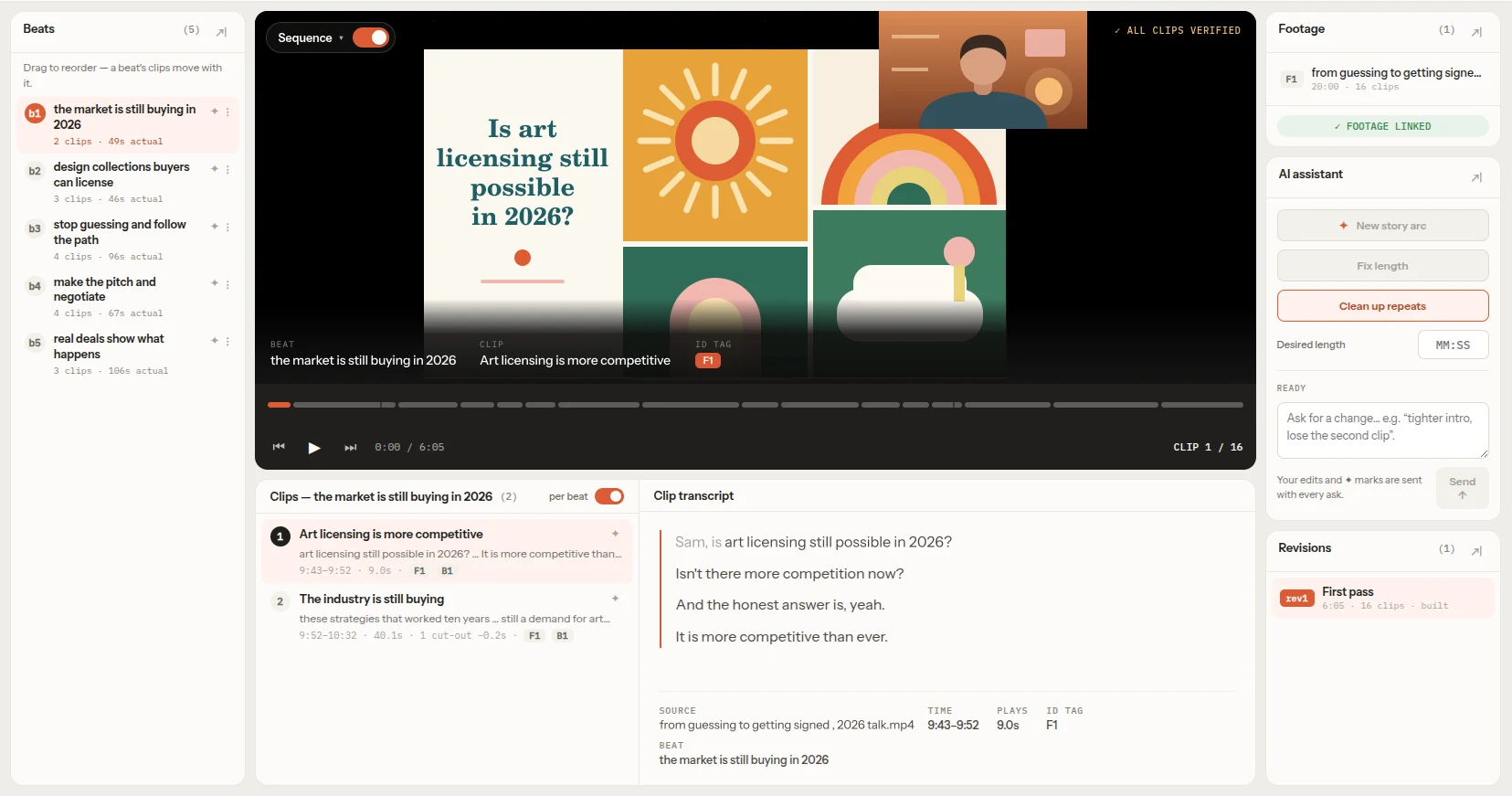
The FirstCut editor: the story's beats listed on the left, the sequence playing in the centre with its clips and the transcript of the selected clip below it, and the AI assistant, footage and revisions panels on the right.
  1. 1Beats
  2. 2Clips
  3. 3Words

One workspace. From narrative arc to individual words.

THE IDEA

Your footage can tell more than one story.

FirstCut helps you discover them.

Instead of starting with a timeline, start with the narrative. FirstCut organizes your footage into beats and clips so you can see how a story is built, understand what each part is doing, and explore completely different ways to tell it.

Read the story. Explore the footage behind it. Change the story.

EXPLORE

Find different stories in the same footage.

There is rarely only one way to tell a story. Generate a new narrative arc and see how the same footage can become a different story.

01
New story arc
Generate another narrative with a click.
02
Compare approaches
Read the beats and clips of a new version before watching the whole sequence.
03
Keep exploring
Your original story stays intact while you experiment with another direction.
BEATS

See the story, not just the cuts.

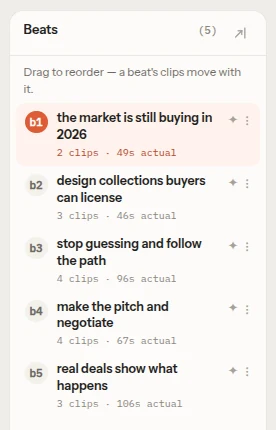
A beat is a change point or narrative point in the story — a moment where the direction, idea, tension, or meaning moves forward.

Each beat is an abstract part of the narrative, built from the consecutive clips that tell it.

  • Understand the structureThe beat list gives you a readable outline of the entire story.
  • Reorder the storyDrag beats into a new order and reshape the narrative without rebuilding the edit from scratch.
  • Edit, add or deleteRename a beat, give it its own instruction, add a new one or delete it — and let FirstCut rebuild the sequence around your decisions.
  • Think at the right levelWork on the story as a story — before getting buried in individual cuts.
The beats panel: five beats listed as an outline of the story, each showing its number of clips and its length, with drag-to-reorder and edit controls.
CLIPS

Every beat leads to real footage.

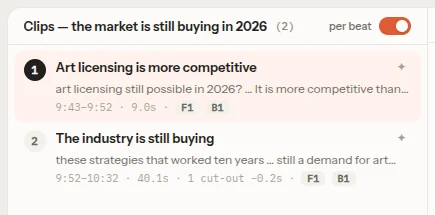
A clip is an actual span of source footage — from one timestamp to another — connected directly to its place in the story.

Every clip carries the relevant text from its transcript, so you can understand exactly what is being said and why that footage is there.

  • Browse all clipsSee the complete collection of clips across the sequence.
  • Focus on one beatSwitch to clips belonging only to the selected beat.
  • Reorder, delete or askMove clips, delete the ones you don't want, or tell the AI what to change in a clip — or what new clip to find — on your next rebuild.
The clips panel for the selected beat: two clips, each with the start and end timestamps of its source footage and the opening words of its transcript.
WORD LEVEL

See only the words you are editing.

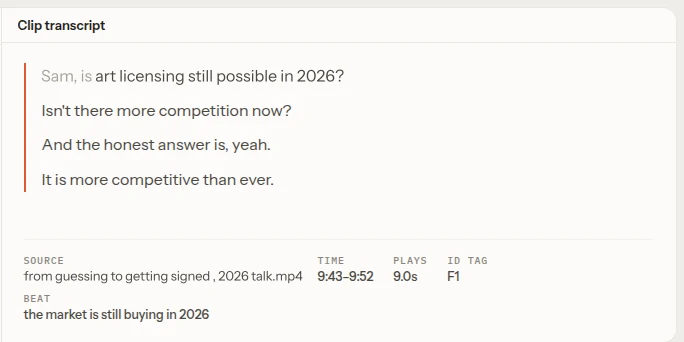
Select a clip and FirstCut shows the transcript for that clip — not an overwhelming transcript of the entire project.

The words stay connected to the footage and the beat they belong to, so you can make precise edits while keeping the story in view.

  • Cut words or linesMark exactly what should be removed from the clip.
  • Restore anythingChange your mind and remove a previous cutoff mark.

From the shape of the story to a single sentence.

The clip transcript panel: only the few lines spoken in the selected clip, with the source file, time range and beat it belongs to shown underneath.
AI ASSISTANT

Describe the change.

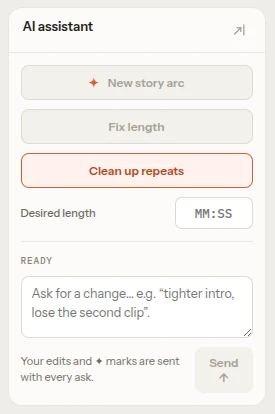
Tell FirstCut what you want changed in plain language. It turns your request into actions on the sequence and creates a new revision.

“Make the intro tighter.”
“Give this beat a stronger focus on the customer.”
“Remove the repetitive section.”
“Build a different ending.”
“Tell this story from the product’s perspective.”
“Make the sequence about two minutes longer.”

Think in editorial terms. FirstCut handles the assembly.

The AI assistant panel: buttons for a new story arc, fixing the length and cleaning up repeats, a desired-length field, and a box to ask for any change in plain language.
INSTANT FEEDBACK

Change it. Then watch it.

Every change updates the sequence so you can play the result immediately in the browser.

Move a beat. Remove a clip. Cut a sentence. Ask for a completely different narrative. Then press play and see what changed.

No waiting to discover what your idea looks like.

REVISIONS

Explore without losing your way back.

Every meaningful change becomes a new revision. Try a different structure, a different focus, or a completely different story without destroying the version you already have.

  • Jump between revisionsMove back and forth between versions of the sequence.
  • Experiment freelyA new idea does not have to replace the old one.
  • Develop the storyYour edit becomes a history of narrative decisions, not a trail of overwritten timelines.
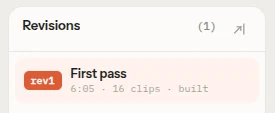
The revisions panel listing the first pass of the sequence as revision 1, with its length, clip count and status.
ONE STORY — FOUR LEVELS

Work at the level that matters.

LEVEL 1
Narrative
What story are you telling?
LEVEL 2
Beat
What needs to happen next?
LEVEL 3
Clip
Which piece of footage tells it?
LEVEL 4
Words
Which exact words stay?

Move from big editorial decisions to precise cuts without leaving the same workspace.

HOW IT WORKS

From footage to first cut.

  1. 01
    Bring in your footage
    Connect your source footage and let FirstCut map the spoken material.
  2. 02
    Explore the story
    Review the narrative as beats and clips.
  3. 03
    Try another direction
    Generate a new story arc from the same footage.
  4. 04
    Shape the narrative
    Reorder beats, change clips, and refine what is actually being said.
  5. 05
    Ask for changes
    Describe what you want and let the assistant create a new revision.
  6. 06
    Play the cut
    Review the resulting sequence immediately in the browser.
  7. 07
    Export
    Take the rough cut into your professional editing workflow for finishing.
WHEN THE STORY IS RIGHT

Finish the video in your editor.

FirstCut is where you discover and shape the story. Your professional editor is where you finish it.

Once the narrative works, export the sequence with the source footage and timecodes preserved, ready for the next stage of editing.

FCPXMLFCP7-XMLCMX3600 EDLOTIO
Premiere Pro · DaVinci Resolve · Final Cut Pro · Media Composer

Find the story here. Finish the video where you already edit.

YOUR FOOTAGE

Your video stays on your computer.

FirstCut works in the browser, using your local footage while the material needed for transcript and AI processing is handled separately. Only the audio is uploaded to make the transcript.

Nothing to install. No desktop editor required.

MADE FOR STORY-DRIVEN FOOTAGE

Whenever the story lives in what people say.

Interviews
Find the argument, the character, the turning points, and the strongest moments.
Documentaries
Explore different narrative structures across hours of interviews and source material.
Podcasts
Turn long conversations into focused stories without losing the thread.
Courses & lectures
Find the ideas that matter and shape them into a clearer sequence.
Webinars & conversations
Turn long recordings into purposeful, watchable cuts.

More on how it fits each kind of footage →

THE FIRSTCUT WORKFLOW

Don’t start with the timeline.

Start with the story.

FirstCut makes the narrative itself visible and editable: a story made of beats, beats made of clips, and clips connected to the exact words being spoken.

That gives you a way to make high-level editorial decisions before getting lost in timeline details.

Explore the story. Shape the story. Then make the cut.
YOUR FOOTAGE. YOUR STORY.

Find the story inside your footage.

Generate a narrative. Read the beats. Explore the clips. Refine the words. Play the cut.

Explore more. Watch less. Edit with intent.
FAQ

The short version.

What is FirstCut?
FirstCut is a narrative editor for story-driven video. It helps you discover different stories inside your footage and edit those stories at the level of narrative, beat, clip, and words.
What is a beat?
A beat is a change point or narrative point in the story. It is an abstract part of the narrative made from a sequence of consecutive clips that tell that part of the story.
What is a clip?
A clip is an actual span of source footage defined by its source file and start and end timestamps. Each clip is connected to the corresponding text from the transcript.
Can I create different stories from the same footage?
Yes. You can generate a new narrative arc from the same footage and develop it as another revision.
Can I edit the story manually?
Yes. You can reorder beats, reorder clips, rename, add or delete beats and clips, give any beat or clip its own instruction for the AI, and make word-level transcript cuts.
Can I tell FirstCut what I want in natural language?
Yes. The AI assistant can translate editorial instructions into changes to the sequence, from small clip-level adjustments to major narrative changes.
Can I see the result immediately?
Yes. Each revision can be played directly in the browser.
Does FirstCut replace my professional editor?
No. FirstCut is designed for the narrative and rough-cut stage. Once the story is right, you can take the sequence into your professional editing workflow.
Do I need to install anything?
No. FirstCut runs in any modern browser, on any OS. No desktop app, no GPU.
Does it upload my video?
No. Your browser extracts just the audio and uploads only that. The video never leaves your computer.
Which languages does it support?
FirstCut currently supports English footage. Footage in another language, or with no or very little speech, is transcribed but can’t be used to build a cut.
Does it look at the picture?
No — it works from the transcript. That keeps it fast, and it’s ideal for footage where the story lives in what people say.
What does the AI actually do?
It chooses and orders moments from your own footage — it never generates images, video or audio. FirstCut is an independent product built on third-party speech-to-text and AI language models, and isn’t affiliated with or endorsed by their makers.