Blog · Rough cut and paper edit
How to remove filler words and silences without making the cut choppy
By Eran Strassburg · Updated 2026-10-10
The short answer
Removing every "um" and every pause makes speech sound clipped, because some pauses carry meaning. The safer method is to mark removals instead of deleting them, and choose how many to apply. FirstCut catalogues filler words and quiet gaps as cut-outs and applies them through a four-step pace dial, from natural to fastest. Nothing is deleted, so you can turn the dial back, and the setting carries into the exported timeline.
Why "remove all silences" fails
A pause can be dead air, or it can be a speaker thinking before the line that matters. A tool that removes both makes everyone sound rushed. The same goes for fillers: a "well" at the start of an honest answer is part of the answer.
The second problem is that deletion is final. Once the pauses are gone from the timeline, putting one back means finding it in the source again.
Cut-out versus deletion
A cut-out is a record that says "this span inside the clip can be removed". It stays attached to the clip whether or not it is applied. Applying it shortens what plays. Releasing it puts the words or the gap back. The source footage and the clip are never changed.
The four pace levels
| Level | What is applied |
|---|---|
| Natural | Only the cut-outs you made by hand |
| Fast | Filler words as well. This is the default |
| Faster | Quiet gaps as well |
| Fastest | Quiet gaps cut closer to the words |
Moving the dial is free and reversible. It never uses an AI cut, and the running time shown in the editor follows it.
Cutting or restoring individual words
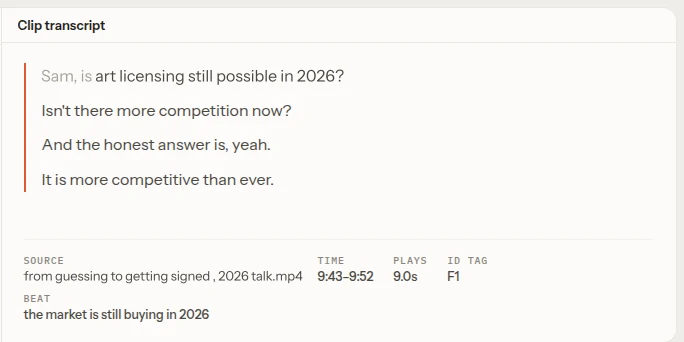
In the clip transcript, select the words you want gone and choose Cut out. Select struck words and choose Release to bring them back. A cut-out you make by hand applies at every pace level, including natural, because it is an edit and not a pacing preference.
A new hand-made cut-out is placed exactly when you save, so save before judging how it sounds.
What the export contains
The exported timeline follows the pace level you chose. A clip with applied cut-outs is written as several shorter events with the removed spans left out, so the cut in your editor matches the one you heard in the browser.
When to leave the pauses in
- Emotional interviews, where the hesitation is the content.
- The beat before a punchline or a reveal.
- Teaching material, where viewers need a moment to follow a step.
For these, set the dial to natural and cut only the words you choose.
Questions
Does changing pace cost an AI cut?
No. It is a free edit, saved as an ordinary revision.
Can I cut one specific word?
Yes. Select the words in the clip transcript and cut them out, then save.
Is anything deleted from my footage?
No. Cut-outs are records on the clip. Your source files are never modified.
Related guides
- How to speed up A-roll editing for talking-head videos
- EDL, FCP7-XML, FCPXML and OTIO: which timeline format to use
- How to make a rough cut from interview footage, by hand and with AI
- Cut a webinar or lecture with FirstCut
Try it on your own footage
FirstCut is free to try with no install and no credit card. Start a rough cut → · Or open the live demo, which needs no account.