Blog · Rough cut and paper edit
An alternative to making a paper edit in a notes document
By Eran Strassburg · Updated 2026-10-10
The short answer
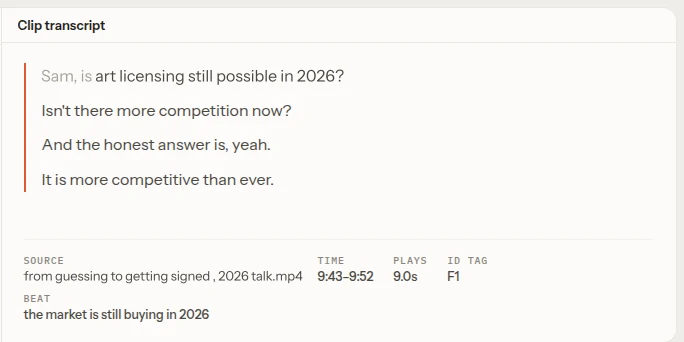
A paper edit in a document has one weakness: it is a copy. Once you start cutting, the document and the timeline drift apart, and every change has to be made twice. The alternative is a plan made of the clips themselves. In FirstCut the outline is the beats, each line is a real span of source footage with its transcript, and the plan plays in the browser and exports as a timeline.
What a paper edit is for
A paper edit is the order of the piece written down before any cutting: sound bites copied from the transcript, grouped under headings, with timecodes beside them. It exists because thinking about structure is easier in text than in a timeline.
Three ways it breaks down
- It cannot be played. A structure that reads well can fall flat when you hear it, and you only find out after rebuilding it in the timeline.
- It goes stale. After the first change made directly in the timeline, the document describes a cut that no longer exists.
- It is transferred by hand. Every quote has to be found again by timecode and cut in, and a typo in a timecode costs you a search.
What "connected" means
| Paper edit in a document | Connected plan | |
|---|---|---|
| A line of the plan | Text copied from the transcript | A span of the source file, with its text |
| Timecodes | Typed by hand | Carried by the clip |
| Hearing the order | After rebuilding it in the timeline | Press play |
| Changing the order | Edit the document, then the timeline | Drag once |
| Getting it into the NLE | Manual re-cut | Import a timeline file |
Doing a paper edit in FirstCut
- Link the interview. Only the audio uploads, for transcription.
- Generate a first cut, with or without a brief.
- Read the Beats panel as your outline. Rename beats so the outline reads the way you would write it.
- Drag clips between beats, delete what does not belong, and cut words inside a clip's transcript.
- Play it. Then export a timeline for your editor.
The step-by-step version for interviews is on the interview paper edit page.
When a document is still the right tool
Some reviews need text. A client who approves wording line by line, a legal read, or a script supervisor's notes are all easier on paper. In those cases the document is the record of approval, and a connected plan is how you get to a version worth approving.
Questions
Can I still share the plan as text?
The beat names and clip transcripts are on screen in the editor and can be copied from there. FirstCut does not export the outline as a document.
Does it work on scripted footage?
It is built for unscripted speech. Scripted takes work when the take you want can be identified from the words.
Do I lose my plan when I ask the AI for a change?
No. Each change is a new revision, and earlier revisions are kept.
Related guides
- How to make a rough cut from interview footage, by hand and with AI
- How to organize interview footage by story beats
- Assembly, rough cut, fine cut: what each stage is for
- Paper edit an interview with FirstCut
Try it on your own footage
FirstCut is free to try with no install and no credit card. Start a rough cut → · Or open the live demo, which needs no account.