How to find the story in hours of interview footage
By Eran Strassburg · Updated 2026-10-10
The short answer
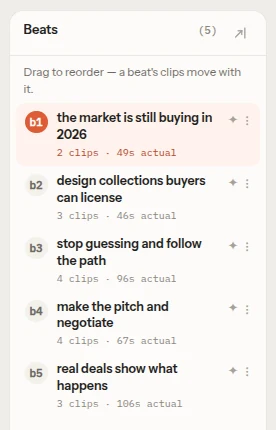
You find the story in an interview by reading it before you cut it. Transcribe the footage, mark the moments where something changes, group them into four to six beats, and only then pick the clips that carry each beat. FirstCut does this first pass from the transcript and gives you the beats, the clips under them and the exact words, so you edit the story instead of the timeline.
Why scrubbing fails on long interviews
Watching an interview in the timeline shows you one moment at a time. You remember the lines that were delivered well, and you lose track of what the whole conversation was about. After two hours you have a bin of good quotes and no order for them.
Text does not have that problem. You can read an hour of speech in a few minutes, see the whole of it at once, and notice that the answer at minute 50 is the real opening.
Step 1: get a transcript you can read
Any accurate transcript with timecodes will do. It needs speaker labels if there is more than one voice, and it should keep the filler words and false starts, because they tell you where a take was restarted.
Step 2: mark change points, not good quotes
Read the transcript once without marking anything. On the second pass, mark every place where the subject changes direction: a new topic, a reversal, a decision, an admission, a result. These are the joints of the story.
A good quote is something you want to keep. A change point is something the story cannot do without. Start with the second kind.
Step 3: name four to six beats
Group the change points into steps and give each one a name of a few words: "Why she left", "The first failure", "What changed". Four to six is enough for most short pieces. If you need ten, you probably have two stories.
Read the names in order. If the list makes sense to someone who has not seen the footage, you have a structure. More on this in how to organize interview footage by story beats.
Step 4: fill each beat with real clips
Now go back for the quotes. Under each beat, list the spans of footage that carry it, with their in and out timecodes. Leave out anything that does not serve the beat it sits under, however well it was said.
The same four steps in FirstCut
- Link the interview files. The browser extracts the audio and uploads only that for transcription. The video stays on your disk.
- Optionally write a short brief or pick a story shape. An empty brief is accepted.
- Generate. You get a sequence of named beats, each holding real clips with source timecodes and their transcript.
- Play it in the browser, then rename, reorder or delete beats and clips, or ask for a change in plain language.
You can see this on sample footage, with no sign-up, in the live demo.
Working with a lot of footage
Each file can be up to 2 hours. One sequence can be built from up to 1 hour of footage on the Free plan and up to 10 hours on a paid plan, counted across all the files in it.
When a sequence has more than 2 hours of footage, the longest cut you can ask for is 60 minutes. The length is a target, and the cut that comes back can run shorter or longer.
For a shoot with several separate interviews, one sequence per interview is still the easier route: each story stays readable, and you join them in your editor.
Questions
How much footage can I work on at once?
Up to 10 hours of footage in one sequence on a paid plan and 1 hour on the Free plan, with each file at most 2 hours. From more than 2 hours of footage, the longest cut you can ask for is 60 minutes.
Do I need a script first?
No. A short brief helps, and an empty one is accepted. FirstCut then looks for the story in the transcript itself.
Does FirstCut watch the video?
No. It works from the transcript, so it suits footage where the story is in what people say.
Related guides
- How to organize interview footage by story beats
- What is a narrative editor for video?
- How to make a rough cut from interview footage, by hand and with AI
- Paper edit an interview with FirstCut
Try it on your own footage
FirstCut is free to try with no install and no credit card. Start a rough cut → · Or open the live demo, which needs no account.