What is a narrative editor for video?
By Eran Strassburg · Updated 2026-10-10
The short answer
A narrative editor is a tool for editing the story of a video before editing the picture. Instead of a timeline of tracks, you work on four levels: the narrative arc, the beats that make it up, the clips inside each beat, and the words inside each clip. FirstCut is a narrative editor that runs in the browser and exports the finished story as a timeline for Premiere Pro, DaVinci Resolve or Final Cut Pro.
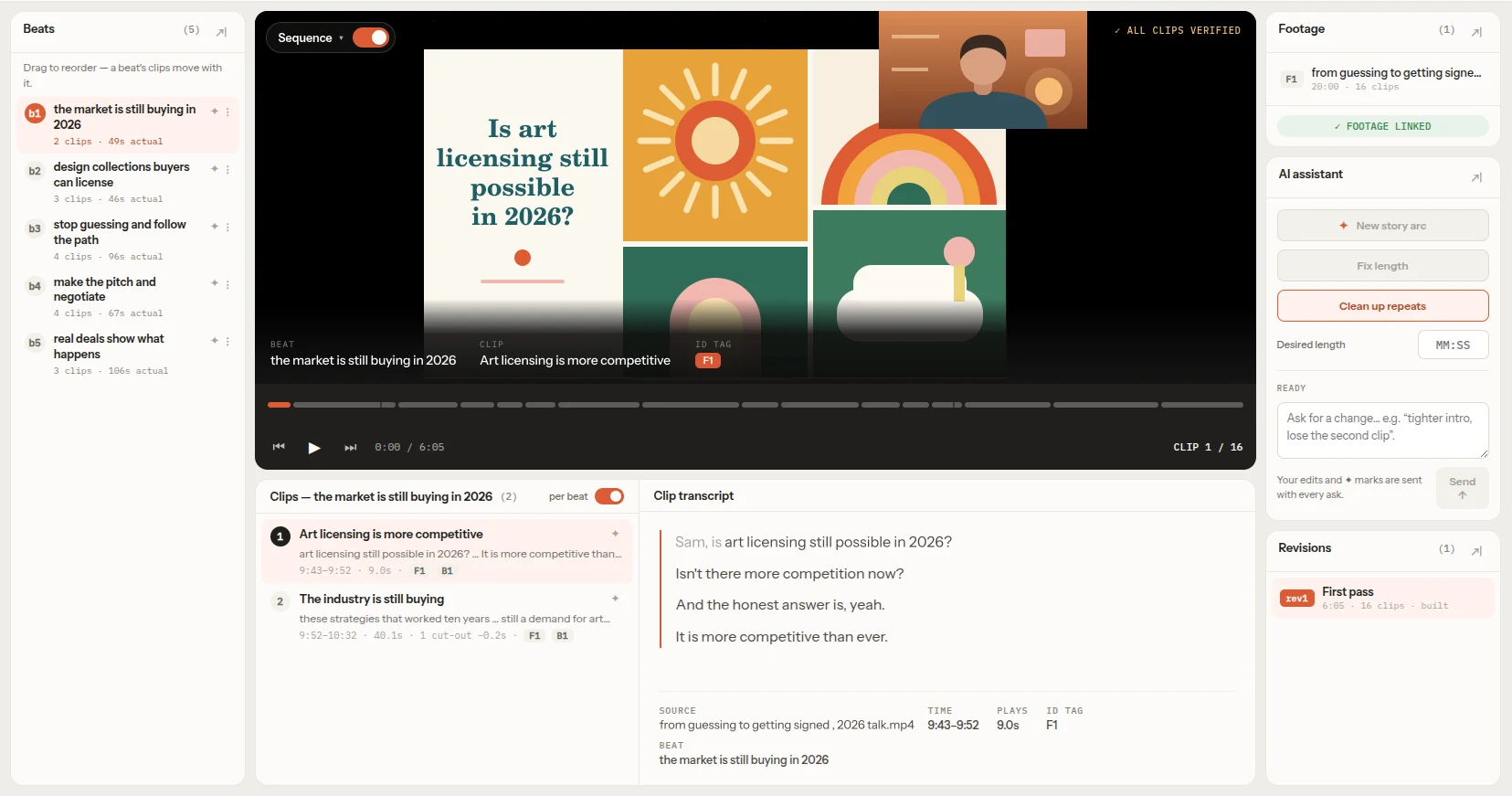
The four levels, with one example
Take a 40-minute interview with a founder that has to become a 4-minute film.
| Level | What it is | In the example |
|---|---|---|
| Narrative arc | The shape of the whole piece | Problem, then fix, then proof |
| Beat | One step of the story, a named group of clips | "Why the first version failed" |
| Clip | A real span of source footage with in and out timecodes | 14:02 to 14:31 of the interview file |
| Words | The transcript inside a clip | Cutting "you know, basically" from the middle of a sentence |
A change at one level leaves the others alone. You can reorder two beats without touching a clip, or cut three words without changing the structure.
How it differs from an NLE
A non-linear editor such as Premiere Pro, Resolve or Final Cut Pro is organized around tracks and frames. It is the right tool for picture, sound, color and graphics. It has no object called a beat, so the structure of the story lives in your head or in a separate document.
A narrative editor makes that structure the thing you edit, and leaves finishing to the NLE.
How it differs from a text-based video editor
A text-based editor lets you cut video by deleting words in a transcript, and usually renders the result. It works at the level of words and clips.
A narrative editor adds the two levels above that: beats and the arc. It answers "what is this piece about, and in what order" before "which words stay".
What a narrative editor does not do
- It does not look at the picture, choose B-roll or switch camera angles.
- It does not add captions, music, color or effects.
- It does not render a finished video file. It hands a timeline to your editor.
- It does not generate images, video or audio. Every clip is a span of your own footage.
Who needs one
Anyone whose footage is led by speech and is longer than the piece they have to deliver: documentary and interview editors, video podcasters, people cutting webinars, courses and talks, and long-form YouTube creators.
If your material is mostly action, music or visuals with little speech, a narrative editor that reads transcripts has nothing to read.
Trying one
FirstCut has a live demo with the real editor on sample footage and no sign-up. The Free plan covers 30 minutes of media and 5 AI cuts a month with no credit card.
Questions
Does a narrative editor replace Premiere or Resolve?
No. It covers the story and rough-cut stage. Picture, sound, color and graphics stay in your editor.
Is it the same as a paper edit?
It does the same job, but the plan stays connected to the real clips and plays back, where a paper edit is a separate document.
Does it work without an install?
FirstCut runs in any modern browser on any OS, with no desktop app and no GPU.
Related guides
- How to find the story in your interview footage
- Assembly, rough cut, fine cut: what each stage is for
- AI tools for video editors, sorted by the job they do
- FirstCut, the narrative editor
Try it on your own footage
FirstCut is free to try with no install and no credit card. Start a rough cut → · Or open the live demo, which needs no account.